


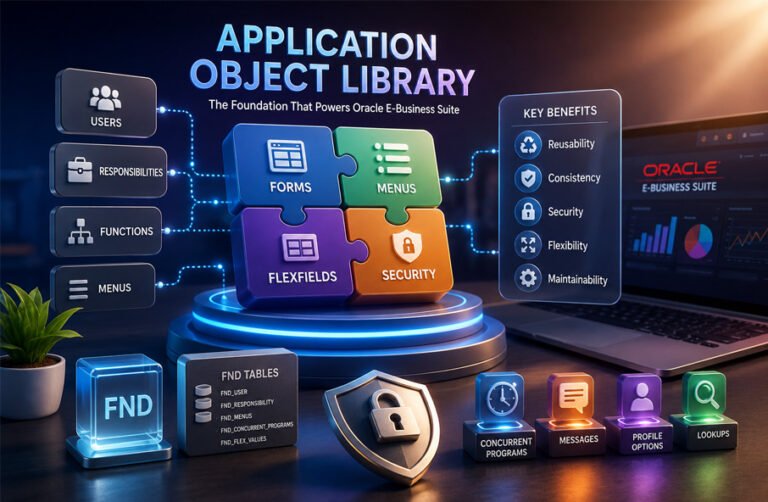
Application Object Library, usually called AOL, is an important part of Oracle E-Business Suite. It provides shared tools and services that many Oracle applications use. These include forms, menus, responsibilities, security, flexfields, profile options, messages, and background processing.
People often search for Application Object Library when they are learning Oracle EBS development, system administration, security, or customization. Understanding AOL also helps explain how users get access to different functions and how custom programs are added to Oracle EBS.
This guide explains Application Object Library in simple words. It covers how AOL works, its main parts, forms, menus, responsibilities, security, flexfields, concurrent programs, and other shared services.
What Is Application Object Library?
Application Object Library is a collection of shared components and services used by Oracle E-Business Suite. Instead of every Oracle module creating its own security system, menus, reports, messages, and configuration tools, AOL provides common facilities that different applications can use.
It includes areas such as forms, reusable routines, concurrent programs, menus, responsibilities, flexfields, database objects, user profiles, and application messages.
AOL is not normally used as a separate business application. For example, Oracle General Ledger and Oracle Purchasing perform specific business tasks. Application Object Library works underneath these applications and gives them common technical services.
One of the main ideas behind AOL is reuse. Developers do not need to build the same basic functions again for every Oracle application. This can reduce repeated work and help different modules behave in a similar way.
Application Object Library is especially useful for Oracle EBS developers, system administrators, database administrators, and technical consultants. They may work with AOL when creating users, setting responsibilities, registering forms, configuring menus, creating concurrent programs, or adding custom functions.
AOL is also closely connected with the term FND. Many database objects related to Application Object Library use names beginning with FND_. FND is commonly associated with AOL metadata, security, menus, users, concurrent programs, and other shared Oracle EBS functions.
How Application Object Library Works
Application Object Library works as part of the technology layer inside Oracle E-Business Suite.
Oracle EBS contains many business applications. These applications may handle finance, purchasing, inventory, human resources, projects, manufacturing, and other business activities. Instead of each application managing common functions separately, AOL provides a shared framework.
A simple example is user access.
A user may log in to Oracle EBS and receive one or more responsibilities. Each responsibility is connected to a menu. The menu contains functions. A function can open a form or another application feature.
The basic relationship is:
User → Responsibility → Menu → Function → Application Feature
This structure is an important part of traditional Oracle EBS access control.
AOL also stores important metadata. This metadata tells Oracle EBS which applications, forms, functions, menus, users, responsibilities, programs, profile options, and other objects exist.
For example, imagine that a company creates a custom purchasing screen. The developer can register the form, create a function for it, add the function to a menu, connect that menu to a responsibility, and then give the responsibility to approved users.
This system makes Oracle EBS easier to manage because application access and configuration are controlled through a common structure.
Forms and Functions
Oracle Forms has historically been an important part of the Oracle E-Business Suite user interface.
A form is a screen that allows a user to view, enter, or update information. Application Object Library provides standards and supporting libraries that help Forms-based applications work correctly inside Oracle EBS.
When a custom form is created, it normally needs to be registered with Oracle EBS. After registration, the developer can create a function for that form and place the function on a menu.
The normal flow is:
Form → Function → Menu → Responsibility → User
This means creating a form alone is not enough. The form must also be connected correctly to the Oracle EBS navigation and security structure.
A function represents a piece of application functionality. In many Forms-based environments, a function points to a form. Functions are then added to menus.
This extra function layer is useful because Oracle EBS security can control access to functions instead of giving direct access to every form.
Application Object Library also supports reusable libraries. Oracle Forms development has used libraries such as APPCORE and FNDSQF to provide common functions.
APPCORE supports Oracle application standards and common utilities. FNDSQF contains routines related to areas such as messages, profile options, flexfields, and other shared functions.
Custom forms should follow the Oracle EBS standards used for the relevant release. This is important because poorly designed custom forms can become harder to maintain after patches or upgrades.
Menus and Responsibilities
Menus and responsibilities are central parts of Oracle EBS navigation and user access.
A menu is a structured collection of functions and other menus. It controls which options can appear to a user.
A menu may contain options such as Customers, Orders, Reports, Transactions, or Administration. These options may open functions directly or lead to smaller submenus.
Menus help organize large numbers of features into a clear navigation structure.
A responsibility controls the level of application access given to a user. Each responsibility is normally connected to a menu and can also be related to other controls such as request groups and data groups.
For example, a user might have responsibilities such as:
- Purchasing User
- Inventory User
- Accounts Payable User
- System Administrator
A single user can have more than one responsibility. When the user changes responsibility, the available functions may also change.
This explains why two employees can log in to the same Oracle EBS system but see different menus and features.
Oracle AOL uses responsibilities and menus together so administrators can give users access based on their work instead of giving everyone access to the entire system.
Security and User Access
Security is one of the main functions of Application Object Library.
Traditional Oracle EBS security uses users, responsibilities, menus, and functions to control access to application features.
The basic security path is:
User → Responsibility → Menu → Function
A user receives one or more responsibilities. Each responsibility gives access to a menu. That menu contains functions that the user can open.
This is commonly called function security.
However, this does not mean that all Oracle EBS security is controlled only by menus. Other security rules can also control which data, operating units, ledgers, programs, or records a user can access.
Administrators should therefore avoid thinking of a responsibility as only a shortcut to a menu. A responsibility can affect important parts of a user’s access.
Good security practice includes giving users only the access they need. This is known as the least privilege approach.
Administrators should also review custom menus and functions carefully. A function added to the wrong responsibility may give users access to a feature they should not have.
Security changes should be tested before they are widely applied. Administrative accounts should be protected, and organizations should keep clear records of important access changes.
Application Object Library configuration should be treated as sensitive because incorrect settings may expose application features or data to the wrong users.
Flexfields, Lookups, and Profile Options
Oracle EBS is used by many different types of organizations. Each business may need different codes, extra fields, or system settings.
Application Object Library provides tools such as flexfields, lookups, and profile options to make the system more flexible.
Key and Descriptive Flexfields
A flexfield allows an organization to configure data structures without completely changing the main Oracle application.
There are two important types: Key Flexfields and Descriptive Flexfields.
A Key Flexfield is normally used for structured information made from several parts or segments. For example, a company may use a Key Flexfield to build an accounting code or another important business identifier.
A Descriptive Flexfield is used to collect extra information about a record. It gives organizations a way to add business-specific information without redesigning an entire application screen.
This is useful because different businesses often need different details.
Oracle documentation also connects flexfields with Application Object Library registration and shared routines used by Forms-based applications.
Lookups
A lookup is a controlled list of values used by an application.
For example, a field may allow values such as Active, Inactive, Pending, or Closed. Instead of letting users enter any text, the system can provide approved lookup values.
Lookups are commonly used for information such as status, type, category, priority, and processing state.
They help keep application data more consistent.
One source describes three common lookup access levels: System, Extensible, and User. System lookups are more restricted, while extensible or user-managed lookups allow different levels of change.
Profile Options
A profile option is a configurable setting that can change how Oracle EBS behaves.
Profile options can normally be set at levels such as:
- Site
- Application
- Responsibility
- User
The Site level can provide a general setting for the entire environment. A more specific setting may then be applied to an application, responsibility, or user.
Profile options can affect areas such as application behavior, user interface settings, flexfields, and concurrent processing.
A simple way to understand profile options is to think of them as configuration switches. The application code can stay the same, while its behavior changes depending on the profile value.
Concurrent Programs and Background Processing
Some Oracle EBS tasks take too long to run directly on a user’s screen. Application Object Library supports concurrent processing so these tasks can run in the background.
Common examples include reports, imports, batch jobs, accounting processes, data processing, and administrative programs.
A concurrent program is a program registered in Oracle EBS so it can run through the concurrent processing system.
A concurrent request is the request submitted to run that program.
A concurrent manager is a server-side process that manages requests and starts the correct programs.
The basic flow is:
User → Concurrent Request → Concurrent Manager → Concurrent Program → Result
This lets the user submit a job without keeping the application screen busy until the job finishes.
Concurrent programs may use technologies such as PL/SQL, SQLPlus, Oracle Reports, C, ProC, or shell scripts, depending on the implementation.
Oracle EBS also uses Standard Report Submission, often called SRS, for submitting certain reports and programs. Administrators may organize available programs into Request Groups so users can access only the programs allowed for their responsibilities.
Concurrent processing can also include scheduling, priorities, output handling, logs, and different concurrent managers.
For custom reports, technologies such as Oracle Reports and XML Publisher may be registered as concurrent programs so users can submit or schedule them through Oracle EBS.
Messages, Libraries, and Shared Services
Application Object Library provides several shared services that help Oracle EBS applications behave in a consistent way.
One example is the application message system.
Messages can be used for errors, warnings, information, instructions, and validation feedback. Instead of every application creating its own message system, AOL provides shared message functions.
This helps users receive more consistent feedback across different Oracle EBS modules.
Reusable libraries are another important part of AOL.
Shared libraries allow developers to use common routines instead of writing the same code repeatedly. These routines can support areas such as navigation, profile options, flexfields, messages, calendars, and standard application behavior.
Oracle EBS Forms standards have also included shared interface elements such as menus, toolbars, visual attributes, property classes, calendars, status bars, and folder objects.
These shared services are a major reason Application Object Library is more than a simple collection of code. It provides common rules, utilities, configuration, and services that help different Oracle EBS applications work as parts of the same system.
FND Tables and Application Metadata
Application Object Library depends on metadata to control many parts of Oracle E-Business Suite.
The term FND is closely linked with AOL. Many AOL-related database tables and objects use names that begin with FND_.
Common examples include:
FND_USERFND_RESPONSIBILITYFND_MENUSFND_CONCURRENT_PROGRAMSFND_FLEX_VALUES
These tables store important information about users, responsibilities, menus, concurrent programs, flexfields, and other Oracle EBS settings.
AOL metadata also helps Oracle EBS know which applications exist, which forms are registered, which functions belong to menus, which users have which responsibilities, and which programs are available.
This makes the system flexible because many settings can be changed through configuration instead of changing the main application code.
Developers should be careful with FND tables. They should not treat them like normal business tables.
Directly changing AOL metadata can cause problems with security, navigation, concurrent processing, patches, upgrades, and Oracle support. The safer approach is to use supported Oracle forms, APIs, loaders, configuration tools, and documented procedures.
Customization and Application Registration
Many companies customize Oracle E-Business Suite to match their own business needs.
Common customizations include custom forms, reports, concurrent programs, menus, responsibilities, flexfields, and integrations.
Application Object Library helps these custom parts fit into the Oracle EBS structure.
For example, a custom form may follow this process:
Custom Form → Application Registration → Function → Menu → Responsibility → User
The form is first created according to Oracle EBS standards. It is then registered with the correct application. A function is created for it, the function is added to a menu, and the menu is made available through a responsibility.
Only users with that responsibility can normally access the function.
Application registration is important because it helps Oracle EBS identify which objects belong to an application. It also helps with maintenance and upgrades.
Custom objects should normally be kept separate from Oracle’s standard objects.
For example, organizations often use custom application names or schemas rather than changing seeded Oracle schemas directly.
This makes custom work easier to track, test, maintain, and upgrade.
Developers should also document the connections between forms, functions, menus, responsibilities, concurrent programs, database objects, flexfields, and profile options.
AOL Files and APPL_TOP
Traditional Oracle E-Business Suite environments use a structured file system.
One important location is APPL_TOP.
APPL_TOP contains application files and product-specific directories. Different Oracle modules may have their own top directories, such as GL_TOP for General Ledger.
Inside these areas, files are often organized by type.
For example:
- Forms may contain compiled form files.
- Reports may contain report files.
- BIN may contain executable programs.
- LIB may contain compiled object code.
- SQL may contain SQL or PL/SQL scripts.
- HTML may contain web-related files.
- LOG and OUT may contain concurrent program logs and output.
One source describes this type of directory structure for Oracle Apps environments.
The exact layout can depend on the Oracle EBS release and environment.
These directories are important because registered forms, programs, and reports often depend on files stored in the correct location.
If a custom program is registered correctly but its file is missing or placed in the wrong directory, it may not run.
Application Object Library in Oracle EBS R12.2
Oracle E-Business Suite Release 12.2 added important changes to how the system is patched and maintained.
One major change is online patching.
Online patching allows many patches to be applied while users continue working in Oracle EBS.
Release 12.2 uses Oracle Database Edition-Based Redefinition as part of this patching model.
This is important for custom Application Object Library components.
Custom forms, database objects, concurrent programs, and other extensions should follow Release 12.2 development and deployment rules.
A customization that worked in an older version may not be safe to move into R12.2 without checking its compatibility.
Developers should therefore understand both traditional AOL concepts and newer R12.2 requirements.
Oracle Application Framework, usually called OAF, is also important in Oracle EBS.
AOL and OAF are related, but they are not the same thing.
Application Object Library provides shared services and infrastructure across Oracle EBS.
Oracle Application Framework is mainly used for developing and running HTML-based Oracle EBS application pages.
Understanding this difference helps avoid confusion when working with older Forms-based features and newer web-based Oracle EBS components.
Benefits of Application Object Library
Application Object Library gives Oracle EBS a shared structure.
One major benefit is reuse. Developers can use existing components instead of creating the same functions again.
It also helps create a more consistent system. Menus, security, messages, profile settings, and background processing can follow common rules across different Oracle applications.
AOL also supports centralized administration.
Administrators can manage users, responsibilities, menus, profile options, concurrent programs, and other shared settings from a common framework.
Flexfields and lookups add flexibility. Organizations can adjust parts of the application without rebuilding the whole system.
Concurrent processing is another important benefit. Large reports and background jobs can run without blocking normal user work.
Good AOL design can also make custom applications easier to maintain because they follow the same structure as standard Oracle EBS functions.
Limitations and Challenges
Application Object Library can be difficult for new users to understand.
One reason is the number of connected parts.
A single custom form may depend on a function, menu, responsibility, profile option, database object, and security setting.
This means one small change can sometimes affect several areas.
Older Oracle EBS environments may also contain a mix of Oracle Forms, PL/SQL, older reports, custom programs, and newer web technologies.
This can make maintenance more complex.
Security is another challenge.
Giving access to the wrong function or responsibility may expose features or data that a user should not have.
Upgrades can also create problems when customizations do not follow Oracle standards.
Another issue is legacy technology. Some Oracle EBS installations still depend heavily on Forms-based tools while newer systems may use web services and other modern interfaces.
Application Object Library itself should not be treated as one single performance problem. Performance usually depends on the specific component involved, such as a slow concurrent program, a heavy database query, or a badly designed customization.
Common AOL Problems and Troubleshooting
Application Object Library problems often appear as access problems, missing functions, or background jobs that do not run.
Form or Function Is Missing
A user may log in and find that a form or menu option is missing.
The first step is to check the access chain.
Confirm that the form is registered correctly.
Then check whether the function exists and points to the correct form.
Next, confirm that the function is included in the correct menu.
Check that the menu belongs to the user’s responsibility.
Finally, confirm that the user actually has that responsibility.
Security rules or incorrect application registration can also block access.
Concurrent Request Does Not Run
A concurrent request may remain pending, stay on hold, or fail.
Check whether the concurrent program is registered correctly.
Review the program parameters and request settings.
Make sure a suitable concurrent manager can run the program.
Also check the schedule, request status, manager configuration, and any application or data errors.
LOG and OUT files can provide useful details about what happened during execution.
A good troubleshooting approach is to follow the request step by step instead of changing many settings at once.
Problems After Customization or Upgrade
Problems may also appear after a new customization, patch, or upgrade.
Check whether custom objects follow the correct Oracle EBS standards.
Review any direct changes made to seeded objects.
Confirm that the customization works with the current Oracle EBS release.
Also test related menus, responsibilities, security settings, profile options, and concurrent programs.
For R12.2 environments, online patching compatibility should also be checked.
Best Practices for Working With AOL
Good Application Object Library management can reduce future problems.
Use Oracle-supported interfaces whenever possible.
Avoid direct changes to internal AOL metadata unless Oracle clearly supports the method.
Keep custom objects separate from standard Oracle objects.
Use clear naming rules for custom applications, forms, programs, and database objects.
Document important dependencies.
For example, a custom form may depend on a function, menu, responsibility, profile option, database package, and concurrent program.
Security changes should always be tested.
Concurrent programs should also be tested for parameters, scheduling, output, logging, and performance.
Organizations using Release 12.2 should follow current online patching rules.
It is also useful to keep clear records of deployment steps, owners, dependencies, testing history, and upgrade notes.
Is Application Object Library Still Relevant?
Yes. Application Object Library is still important for organizations that use Oracle E-Business Suite.
Many companies continue to depend on EBS for finance, purchasing, inventory, human resources, manufacturing, and other business work.
These environments often contain years of custom forms, reports, responsibilities, concurrent programs, and integrations.
AOL knowledge is therefore still useful for maintenance, support, security, troubleshooting, and development.
Modern Oracle EBS environments may also connect with web applications, REST services, cloud platforms, analytics tools, automation systems, and modern identity services.
This means AOL is now part of a wider technical environment.
Traditional AOL knowledge is still useful, but technical teams also need to understand newer Oracle EBS tools and integration methods.
Bottom Line
Application Object Library is a shared foundation inside Oracle E-Business Suite.
It helps manage forms, functions, menus, responsibilities, security, flexfields, profile options, messages, concurrent programs, and other common services.
Its main value comes from giving different Oracle applications a common structure.
Developers use AOL to register and connect custom functions.
Administrators use it to manage access and configuration.
Oracle EBS users depend on it every time their responsibilities, menus, reports, and application functions are loaded.
For modern Oracle EBS environments, especially Release 12.2, it is important to follow current Oracle standards and avoid unsupported direct changes to internal metadata.
Understanding Application Object Library makes many other Oracle EBS concepts easier to understand.
Frequently Asked Questions
What is Application Object Library in Oracle EBS?
Application Object Library, or AOL, is a shared technology layer used by Oracle E-Business Suite. It provides common services such as forms support, menus, responsibilities, security, concurrent processing, flexfields, profile options, and messages.
What does AOL stand for in Oracle Apps?
AOL stands for Application Object Library.
In Oracle Apps and Oracle E-Business Suite, the term refers to the shared application framework used for common technical and administrative services.
What is FND in Application Object Library?
FND is the name and prefix commonly connected with Application Object Library objects.
Many AOL-related database tables and packages begin with FND_, such as tables for users, menus, responsibilities, concurrent programs, and flexfields.
What is the difference between a menu and a responsibility?
A menu is a collection of functions and submenus.
A responsibility gives a user access to a specific menu and other related controls.
In simple terms, the menu contains the available options, while the responsibility helps decide which user can see and use them.
What is a concurrent program in Oracle AOL?
A concurrent program is a registered program that runs through Oracle EBS background processing.
The user submits a concurrent request, and a concurrent manager starts the program when the required conditions are met.
Concurrent programs are often used for reports, imports, batch jobs, and other long-running tasks.
What are flexfields used for?
Flexfields allow organizations to configure business data without fully redesigning Oracle EBS.
Key Flexfields are often used for structured business identifiers.
Descriptive Flexfields are used to capture extra information about application records.
Can developers directly update FND tables?
Direct changes to FND tables are generally not recommended unless Oracle documents and supports the change.
Unsupported updates can cause problems with security, navigation, patches, upgrades, and support.
Using supported forms, APIs, loaders, and Oracle-approved tools is safer.
Is Application Object Library still used in Oracle EBS R12.2?
Yes.
Application Object Library concepts remain important in Oracle EBS R12.2.
Developers and administrators still work with responsibilities, menus, concurrent programs, flexfields, profile options, and other shared services.
They also need to understand R12.2 topics such as online patching, newer web-based technologies, and current Oracle development standards.
More To Explore:
