

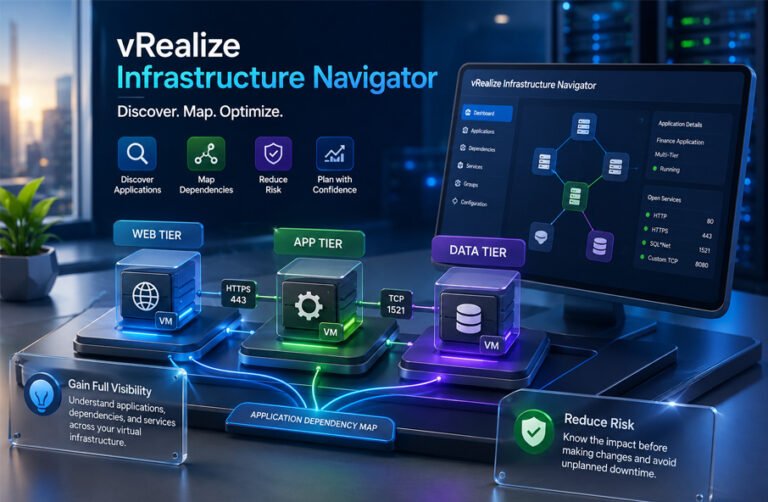
vRealize Infrastructure Navigator, often called VIN, was a VMware tool made to discover applications and show how virtual machines depend on each other.
It helped VMware administrators understand what was running inside their virtual environment. It could show services, application relationships, and communication between virtual machines.
People still search for vRealize Infrastructure Navigator because some older VMware environments may still use it, while others want to understand what replaced it. This guide explains what VIN was, why VMware created it, how it worked, its main features, integrations, uses, and benefits.
What Is vRealize Infrastructure Navigator?
vRealize Infrastructure Navigator was a VMware application discovery and dependency-mapping tool for virtual environments.
It was designed to give administrators more information than normal VM monitoring. A vCenter Server could already show details such as CPU, memory, storage, host location, and network settings. VIN added another layer by helping administrators understand what applications and services were running inside those virtual machines.
VIN was installed as a virtual appliance and connected to VMware vCenter Server. Administrators could then see its information through the vSphere Web Client.
The product was first known as VMware vCenter Infrastructure Navigator. VMware later renamed it vRealize Infrastructure Navigator when several management products moved under the vRealize brand.
VIN was not a hypervisor and did not replace vCenter Server. It was also not a complete application performance monitoring platform. Its main job was to discover applications and show relationships between virtual machines and services.
Why VMware Created VIN
Large virtual environments can contain hundreds or even thousands of virtual machines. Knowing the name of a VM does not always explain what it does.
For example, one business application may use several separate machines. One VM may run the website. Another may run the main application. A third may contain the database.
The structure may look like this:
Web Server → Application Server → Database Server
If an administrator shuts down or moves one of these machines without knowing the connection, the whole application may stop working.
This can become a problem during server migrations, hardware maintenance, upgrades, disaster recovery, or security changes.
VMware created VIN to give administrators more application-level information. Instead of looking at each VM as a separate system, administrators could see how several machines worked together.
This made it easier to understand the possible effect of a change before making it.
How vRealize Infrastructure Navigator Works
VIN worked by deploying a virtual appliance inside a VMware environment and connecting it to vCenter Server.
After the appliance was configured, administrators could enable application discovery. VIN then collected information about virtual machines, applications, services, processes, ports, and communication relationships.
The information appeared in the vSphere Web Client as application and dependency views.
For example, VIN might show that a web server connects to an application server, which then connects to a database server. It could also show communication information linked to those connections.
VIN did not normally require a separate VIN agent to be installed inside every virtual machine. This is why VMware described its discovery method as agentless.
However, agentless did not mean that nothing was needed inside the guest operating system. VIN depended on VMware Tools and VMware guest-access technology to collect important information.
If VMware Tools was missing, too old, or incompatible, application discovery could fail or return incomplete results.
The discovery results helped administrators build a clearer picture of the application environment without manually checking every VM.
Key Features of vRealize Infrastructure Navigator
Application and Service Discovery
Application discovery was one of the main functions of VIN.
The tool could automatically identify supported applications and services running inside virtual machines. This reduced the need for administrators to keep every application record manually.
It could provide useful information about processes, services, and application components where supported.
Common enterprise software such as database servers and web services could be identified in supported environments.
However, VIN could not always recognize every application. Custom software or unusual applications could be harder to identify correctly.
Dependency Mapping
Dependency mapping was one of the most useful VIN features.
It showed how virtual machines and applications were connected to each other.
For example, an administrator could see that a front-end web server depended on another VM running an application service. That application service might then depend on a database server.
This made it easier to understand multi-tier applications.
Dependency maps were especially useful in environments where documentation was missing or out of date.
Administrators could use these maps before changing, migrating, restarting, or removing a virtual machine.
Port and Communication Visibility
VIN could also provide information about communication between virtual machines.
This included TCP and UDP port information linked to discovered relationships.
Port visibility could help administrators understand which services were talking to each other. It was useful for troubleshooting, migration planning, firewall planning, and network segmentation work.
For example, if two VMs were connected through a database service, VIN could help show that communication relationship.
VIN was not a full packet-inspection or advanced network-security platform. Its purpose was mainly to help administrators understand application and infrastructure dependencies.
Application Dependencies View
VIN information was available through the VMware vSphere Web Client.
Administrators could select a virtual machine and open its Application Dependencies information to see related systems and services.
This meant the administrator did not have to use a completely separate interface just to understand application relationships.
Having dependency information beside normal VM details made it easier to investigate a system before making changes.
Application Grouping
VIN could also help organize related virtual machines into applications or business services.
For example, several VMs belonging to a finance application could be grouped together.
A group might include a web server, application server, database server, and other supporting systems.
This made large virtual environments easier to understand because administrators could focus on an application as a whole instead of looking at each VM separately.
Integration With Other VMware Products
VIN was closely connected with the VMware ecosystem.
vCenter Server and vSphere
vCenter Server was central to the way VIN worked.
VIN registered with vCenter and used the VMware environment to discover information about virtual machines and services.
Administrators accessed VIN through the vSphere Web Client. The tool was designed for VMware virtual infrastructure rather than for mixed environments from many different virtualization vendors.
VMware Tools inside guest operating systems also played an important part in discovery.
vRealize Operations
VIN could work with vRealize Operations to provide more application context.
The two products did different jobs.
VIN mainly focused on finding applications and mapping relationships. vRealize Operations focused more on infrastructure health, performance, capacity, and operational monitoring.
Together, application dependency information from VIN could help administrators understand performance information in a wider context.
It is important not to treat all vRealize Operations features as VIN features. VIN itself was mainly a discovery and dependency tool.
Site Recovery Manager
VIN information could also help with VMware Site Recovery Manager planning.
Disaster recovery becomes more difficult when one application depends on several virtual machines.
For example, restoring a web server before its database is ready may not bring the application back online.
Dependency information could help administrators understand which VMs belonged together and which systems may need to be recovered in a suitable order.
VIN was therefore useful when planning recovery for multi-tier applications.
Network Security and Microsegmentation
Application relationships could also be useful for network-security planning.
If administrators knew which VMs communicated and which ports they used, they could make better decisions about firewall rules and network segmentation.
This type of information became useful in VMware NSX and microsegmentation projects.
However, VIN itself was not a firewall or full security-management product. It provided visibility that could support security planning.
Common Uses for VIN
VIN was mainly used when administrators needed to understand what was running inside a VMware environment and how systems depended on each other.
One common use was migration planning. Before moving a VM to another host, data center, or platform, administrators could review its known dependencies.
VIN was also useful before maintenance. If a server needed to be restarted, patched, or changed, administrators could check which other systems might be affected.
Another use was troubleshooting. If an application stopped working, dependency information could help show which supporting servers and services were involved.
VIN could also help with disaster recovery. It gave teams a clearer view of multi-tier applications and the systems that needed to be available for those applications to work.
It was useful in environments with poor documentation as well. Administrators could use discovered relationships to understand systems they had recently inherited.
Security and networking teams could also use service and port information when reviewing traffic relationships, firewall rules, or network segmentation plans.
Benefits of vRealize Infrastructure Navigator
The main benefit of VIN was better visibility.
In a large VMware environment, it could be difficult to know what every virtual machine was used for. VIN helped connect infrastructure information with the applications running on that infrastructure.
It also reduced some manual work. Instead of checking every VM separately and building dependency diagrams by hand, administrators could use automatically discovered information as a starting point.
VIN could also reduce risk during infrastructure changes. If an administrator understood which applications depended on a VM, there was less chance of making a change without knowing its wider effect.
Dependency information was useful during migrations, maintenance, troubleshooting, and disaster recovery.
Another benefit was its agentless design. A separate VIN-specific agent normally did not need to be installed on every virtual machine, although VMware Tools was still important for discovery.
VIN was most useful in traditional VMware environments built around virtual machines. Its benefits were much more limited in modern environments based on containers, Kubernetes, public cloud services, and rapidly changing microservices.
System Requirements and Compatibility
The system requirements for vRealize Infrastructure Navigator depended on the version being used.
For VIN 5.8.4, historical VMware documentation listed these minimum appliance requirements:
- 2 vCPUs
- 4 GB RAM
- About 24 GB of disk space
- Network connectivity to the VMware environment
VIN also needed a compatible version of vCenter Server and the vSphere Web Client.
VMware Tools was important because VIN used it to collect information from guest virtual machines. If VMware Tools was missing, outdated, or incompatible, application discovery could fail or return incomplete information.
VIN was built for older VMware environments. It should not be assumed to work with modern versions of vSphere or current VMware Cloud Foundation products.
How VIN Was Installed and Configured
VIN was normally deployed as an OVA virtual appliance.
An administrator first deployed the appliance through the vSphere Web Client. During setup, the administrator selected the host, datastore, and network settings.
After the appliance was powered on, the network and IP settings were configured. VIN was then connected to vCenter Server.
The administrator also needed suitable vCenter credentials and permissions. These permissions allowed VIN to discover information about virtual machines, applications, services, and dependencies.
A valid VIN license was also required.
Once configuration was complete, application discovery could be enabled. The results then appeared in the vSphere Web Client.
Some third-party guides say discovery results could appear within 10 to 15 minutes. However, this should be treated as an estimate. Discovery time could depend on the size and condition of the environment.
Licensing and Pricing
vRealize Infrastructure Navigator was commercial VMware software.
Older VMware licensing information shows that VIN was available under per-virtual-machine licensing in some product generations.
It was also included or connected with some VMware management suite editions, including higher-level vRealize Operations packages.
Licensing changed over time, so there was not one single pricing model for every VIN version.
VIN is no longer an active VMware product. Because of that, there is no useful current retail price for it.
Old prices found on reseller websites should not be treated as current prices.
Security and Privacy
VIN needed access to important parts of the VMware environment.
Administrators had to provide vCenter credentials with enough permissions for discovery. This meant the appliance had access to infrastructure information and guest-related application data.
VIN could collect information such as:
- running services
- processes
- communication relationships
- TCP and UDP ports
- application dependencies
This information could be useful for management and security work, but it also meant the appliance had to be protected carefully.
Historical VIN deployments also required several network ports for communication with vCenter, ESXi hosts, the vSphere Web Client, and other VMware services.
VIN had security issues during its lifetime. VMware released security updates for affected versions.
One example involved CVE-2015-6934, which was connected with an Apache Commons Collections deserialization issue. VMware provided VIN 5.8.5 as part of the fix for affected 5.8.x systems.
This is important today because VIN is no longer supported. Old appliances may not receive security fixes for newer problems.
VIN should also not be described as a full compliance platform. Its visibility could help with security reviews, but it did not itself provide complete PCI-DSS, HIPAA, or other compliance management.
Common Problems and Troubleshooting
VMware Tools Problems
VIN relied on VMware Tools for important guest discovery functions.
If VMware Tools was missing or too old, VIN might not discover applications correctly.
A common historical fix was to update VMware Tools to a compatible version.
Application Discovery Does Not Work
Discovery could fail because of permissions, VMware Tools, licensing, or communication problems.
Administrators had to check that VIN was connected to vCenter, had the correct credentials, and had a valid license.
Network communication also had to be working correctly.
Application Dependencies Tab Is Missing
Historical documentation reported cases where the Application Dependencies view disappeared after vCenter Server was restarted.
In some cases, restarting the VIN appliance helped restore authentication and plug-in communication.
Problems After Changing the IP Address
Changing the VIN appliance IP address could cause the plug-in to stop working correctly.
Older VMware guidance recommended restarting the VIN appliance after an IP address change.
DHCP and Network Problems
Historical VIN documentation also reported problems when DHCP settings changed or when the appliance received a new network address.
Restarting the VIN appliance and, in some cases, the vSphere Web Client could help.
A stable network configuration was normally better for a management appliance like VIN.
License Problems
VIN could fail to start discovery if the correct license was not assigned.
Administrators had to check the VMware licensing section and confirm that the VIN solution had an active license.
VIX Compatibility Problems
VIN depended on older VMware guest-access technology, including VIX-related functions.
Newer VMware Tools versions changed or disabled some VIX functions for security reasons.
This created compatibility problems for older products such as VIN.
Because VIN is now end of life, there is no modern support path for solving every compatibility issue.
Limitations of vRealize Infrastructure Navigator
VIN was useful in traditional VMware environments, but it had several important limits.
It was strongly tied to VMware infrastructure. It was not designed as a vendor-neutral discovery platform.
It also depended on older VMware technologies such as the vSphere Web Client, VMware Tools, and VIX-related guest access.
Application discovery was not perfect. VIN could identify many supported services, but custom applications or unusual setups could be harder to detect correctly.
Dependency maps were useful, but they should not be treated as perfect documentation. Administrators still needed to confirm important relationships before making major changes.
VIN was also not a full application performance monitoring platform. It did not provide the wide range of features found in modern observability tools.
It was not designed for modern technologies such as:
- Kubernetes
- containers
- serverless applications
- fast-changing microservices
- large public-cloud environments
- modern distributed tracing
Another major limitation is support. VIN is no longer updated, which makes it unsuitable for new production deployments.
Is vRealize Infrastructure Navigator Still Supported?
No. vRealize Infrastructure Navigator is no longer supported.
The VIN 5.8.x product family reached the end of its supported lifecycle in September 2017.
That means VMware stopped normal product development and support for VIN.
An unsupported product does not receive the same level of:
- security updates
- bug fixes
- compatibility updates
- feature improvements
- technical support
For this reason, VIN should be treated as a legacy product.
Some websites say version 5.8.7 was the final VIN release. However, the strongest information collected confirms only that the 5.8.x family was the last supported product line. The exact final build should be treated carefully unless official archived release notes confirm it.
Users should also avoid downloading old VIN OVA files from unknown websites. An old virtual appliance may contain security problems and may not work with newer VMware environments.
What Should Existing VIN Users Do?
Organizations still using VIN should first check how important it is to their current environment.
They should identify which teams still use the dependency maps and which application relationships depend on VIN information.
Important application and service relationships should be documented before the appliance is removed.
The next step is to choose a modern replacement based on the actual need. One company may need service discovery, while another may need network flow analysis or full application monitoring.
It is also useful to test a new tool before removing VIN.
In some cases, the old and new tools can run together for a short period. This can help teams compare the information and make sure important dependencies are not lost.
Once the replacement has been tested and staff understand how to use it, the unsupported VIN appliance can be retired.
Modern Alternatives to VIN
There is no single replacement that is perfect for every VIN user.
The best choice depends on whether the main need is application discovery, network dependency mapping, infrastructure monitoring, or full observability.
VMware Aria Operations
VMware Aria Operations is a newer operations management platform for VMware environments.
It focuses on infrastructure health, performance, capacity, and operations.
Organizations may choose it when they want modern monitoring and operations management inside the VMware ecosystem.
It is much broader than VIN, but it is not simply the same product with a new name.
VMware Aria Operations for Networks
VMware Aria Operations for Networks, previously known as vRealize Network Insight, focuses more on network visibility.
It can help with traffic analysis, network flows, security planning, and microsegmentation.
It is useful for organizations that mainly used VIN to understand communication between workloads.
Service Discovery Management Pack
VMware also provided service discovery functions through management packs connected with vRealize Operations.
These tools could discover services running on virtual machines and provide application-related information.
They were designed to continue some of the service-discovery use cases that VIN handled.
Dynatrace
Dynatrace is a modern observability platform.
It can monitor applications, services, infrastructure, containers, and cloud environments.
Organizations often choose it for application performance monitoring, dependency mapping, root-cause analysis, and cloud-native monitoring.
It is much broader than VIN and is better suited to modern distributed applications.
Datadog
Datadog is another modern cloud monitoring and observability platform.
It supports infrastructure monitoring, application performance monitoring, logs, network visibility, and cloud services.
It is useful for organizations that need to monitor VMware systems together with cloud and container environments.
SolarWinds
SolarWinds offers several infrastructure and application monitoring products.
Its virtualization tools can monitor VMware and Hyper-V environments and provide information about VM performance and infrastructure health.
It can be useful for teams that want traditional infrastructure monitoring with support for multiple virtualization platforms.
ServiceNow Discovery and Service Mapping
ServiceNow Discovery and Service Mapping are designed to discover infrastructure and build relationships between services and systems.
These tools can be useful when a company wants application dependency information connected to a CMDB and IT service management system.
They are especially useful in large enterprise environments where service relationships need to be documented and managed centrally.
Device42
Device42 is an infrastructure discovery and dependency-mapping platform.
It can discover devices, applications, services, and relationships across data centers and cloud environments.
It is useful for organizations that want broader discovery beyond VMware-only infrastructure.
Bottom Line
vRealize Infrastructure Navigator was designed to make VMware environments easier to understand.
Its main job was to discover applications, services, ports, and relationships between virtual machines.
That information helped administrators with migration planning, troubleshooting, maintenance, network planning, and disaster recovery.
VIN was useful during the time when large VMware environments were mainly based on traditional virtual machines.
Today, the product is discontinued and unsupported.
Organizations should not use VIN as a new production solution. Existing users should document important dependencies, choose a supported replacement, and plan to retire the old appliance.
Modern tools provide wider support for cloud services, containers, Kubernetes, microservices, and mixed infrastructure.
Frequently Asked Questions
What is vRealize Infrastructure Navigator?
vRealize Infrastructure Navigator was a VMware tool for application discovery and dependency mapping.
It helped administrators understand what was running inside virtual machines and how different VMs and services were connected.
How did vRealize Infrastructure Navigator work?
VIN was deployed as a virtual appliance and connected to vCenter Server.
It used VMware Tools and VMware guest-access functions to discover applications, services, ports, and relationships.
The information was shown through the vSphere Web Client.
Was vRealize Infrastructure Navigator agentless?
Yes, VIN was generally described as agentless because it did not require a separate VIN agent inside every VM.
However, VMware Tools was still important for discovery.
Is vRealize Infrastructure Navigator still supported?
No.
The VIN 5.8.x product family reached the end of its supported lifecycle in September 2017.
It should now be treated as legacy software.
Can I use VIN with modern versions of vSphere?
VIN was built for older VMware environments.
It should not be assumed to work with modern versions of vSphere or current VMware platforms.
Its dependence on older technologies also creates compatibility problems.
What was vRealize Infrastructure Navigator used for?
VIN was mainly used for application discovery, dependency mapping, migration planning, troubleshooting, change planning, security visibility, and disaster recovery.
Is vRealize Infrastructure Navigator safe to use today?
Using unsupported infrastructure software carries security and compatibility risks.
VIN no longer receives normal security fixes or product updates.
Organizations still using it should assess the risk and plan to move to a supported tool.
What can replace vRealize Infrastructure Navigator?
There is no single replacement for every user.
Possible options include VMware Aria tools, Dynatrace, Datadog, SolarWinds, ServiceNow Discovery and Service Mapping, Device42, and other modern discovery or observability platforms.
The best replacement depends on whether the main need is service discovery, dependency mapping, network visibility, infrastructure monitoring, or full application observability.
More To Explore:
