

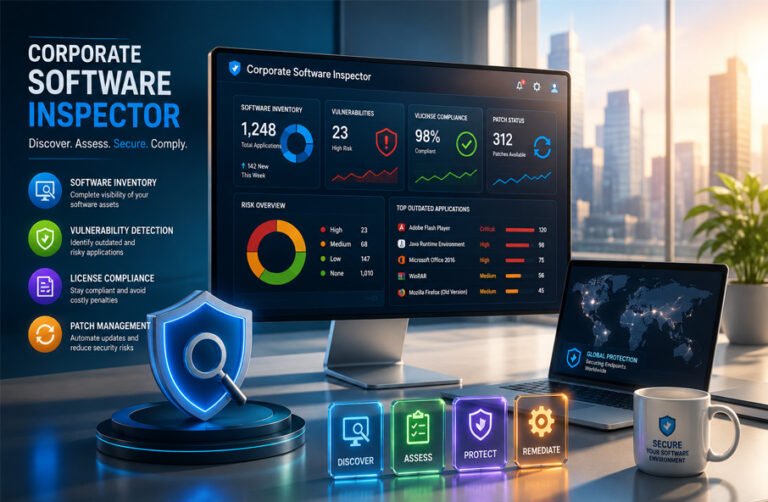
Corporate Software Inspector is a name linked with enterprise software security, vulnerability scanning, and patch management. The best-known use of the term refers to Secunia Corporate Software Inspector (CSI), a business security product designed to find vulnerable and outdated software across company systems.
People also search the term today because some newer websites use it more broadly for software auditing, software asset management, or compliance tools. This can make the meaning confusing.
This article explains what Corporate Software Inspector originally was, how it worked, its main features, its connection with Secunia and Flexera, and how businesses used it to manage software risks.
What Is Corporate Software Inspector?
Corporate Software Inspector, or CSI, was an enterprise security product originally developed by Secunia. It was designed to inspect software installed on company computers and identify programs that were outdated, insecure, or missing important security patches.
Its main job was not to detect viruses in the same way as antivirus software. Instead, it focused on weaknesses in legitimate applications. For example, an older version of a web browser, media player, business program, or system tool could contain a known vulnerability. CSI could identify that version and help the IT team decide what needed to be updated.
The product was mainly intended for organizations with many computers. Instead of checking each machine manually, administrators could scan systems from one central environment and review the results.
Corporate Software Inspector also became closely connected with vulnerability management. Over time, it moved beyond simple scanning and added tools for patch preparation, deployment, reporting, and integration with other enterprise management systems.
The term is sometimes used differently today. Some newer articles describe a “corporate software inspector” as any system that monitors installed software, software licenses, security issues, and IT assets. Others use the phrase for a professional who audits software compliance.
These newer meanings are broader uses of the phrase. The best-documented historical meaning is the Secunia product known as Corporate Software Inspector.
Secunia CSI and Its Move to Flexera
Secunia was a Danish security company known for software vulnerability research and security intelligence. It developed Corporate Software Inspector for business customers that needed better visibility into insecure software running across their networks.
The first Corporate Software Inspector was launched in 2008. Early versions mainly focused on scanning installed applications and checking whether they had the latest security patches.
As the product developed, Secunia added more capabilities. CSI could provide vulnerability information, help administrators identify security updates, create software packages, and support patch deployment.
This changed the product from a basic inspection tool into a broader vulnerability management platform.
Flexera acquired Secunia in 2015. After the acquisition, Secunia’s vulnerability-management technology became part of Flexera’s security portfolio.
The Corporate Software Inspector name remained in use for several years. In 2018, Flexera changed the product name from Corporate Software Inspector to Software Vulnerability Manager, commonly shortened to SVM.
The new name better described what the software had become. It was no longer limited to checking whether applications were secure. It could also help organizations understand vulnerabilities, prioritize risks, prepare patches, and manage remediation.
Today, readers searching for Corporate Software Inspector should understand that it is mainly a historical product name. The modern successor is Flexera Software Vulnerability Manager.
How Corporate Software Inspector Works
Corporate Software Inspector worked by examining software installed across an organization’s computers and comparing that information with vulnerability data.
The process started with a scan. CSI collected information about installed applications and their versions. That information was then checked against Secunia’s vulnerability intelligence to determine whether any applications were affected by known security problems.
If an outdated or vulnerable application was found, the system could show administrators which program was affected and what action might be required.
A typical process looked like this:
Scan systems → identify installed software → check software versions → compare them with vulnerability data → find insecure applications → review available patches → deploy updates → scan again
This allowed IT teams to move from discovery to remediation without manually checking every computer.
CSI could operate in several ways depending on the organization’s network setup.
Agent-Based Scanning
An organization could install a CSI agent on individual computers. The agent could collect information locally and send scan results to the management system.
Agent-based scanning was useful for systems that were not always connected directly to the corporate network, such as laptops and remote devices.
Modern Software Vulnerability Manager continues to use agent-based scanning, especially in distributed and segmented environments.
Remote and Agentless Scanning
CSI and its successor could also perform some scans remotely without keeping a permanent software agent on every target computer.
In this setup, another machine could connect to the target system and collect the required software information using supported operating-system services.
This approach could reduce the number of installed agents, although it depended more heavily on network access, permissions, and system availability.
Network Appliance Mode
CSI agents could also operate in Network Appliance mode.
In this configuration, one machine could act as a scanning point for a group of other systems. Administrators could organize computers into groups and schedule scans from that network location.
This was useful for larger or more complex networks.
Scheduled Scanning
Scans did not always have to be started manually. Organizations could schedule them so that systems were checked regularly.
Later CSI releases also supported randomized agent scan schedules. This helped avoid having large numbers of computers contact the management server at exactly the same time.
Regular scanning was important because software environments change constantly. New applications may be installed, software versions may change, and new vulnerabilities may be discovered after a previous scan.
Key Features of Corporate Software Inspector
Corporate Software Inspector combined several features related to software discovery, security, vulnerability management, and patching.
Software Discovery and Inventory
CSI could scan computers and identify software installed across an organization.
This provided IT teams with a clearer view of applications and software versions running on company systems.
A centralized software inventory is useful because large businesses may operate hundreds or thousands of computers. Without automated discovery, it can be difficult to know exactly what software is installed.
Software inventory also helps administrators identify older applications, unsupported versions, and programs that may need further review.
Some newer articles use the term corporate software inspector more generally for software asset inventory tools that record information such as installation dates, locations, and usage. Those details should not automatically be treated as functions of every historical CSI release.
Vulnerability Detection
Vulnerability detection was one of CSI’s main functions.
The system compared discovered applications with Secunia’s vulnerability information. If a particular software version had a known security weakness, CSI could report it to administrators.
This was especially useful for third-party software. Organizations may manage operating-system updates carefully while still running older versions of browsers, utilities, multimedia software, or other applications.
A vulnerability does not mean that a computer has already been attacked. It means a weakness is known and may need to be corrected.
CSI helped security teams identify these weaknesses before deciding what action to take.
Security Advisories and CVE Information
Later CSI and modern SVM features could provide more detail about known vulnerabilities.
Security advisories could show information about problems affecting particular products. CVE identifiers could also help administrators connect findings with known vulnerabilities recorded under the Common Vulnerabilities and Exposures system.
This made scan results more useful for security teams that needed to understand why an application was considered vulnerable rather than simply seeing a warning.
Patch Management
Corporate Software Inspector gradually became more focused on remediation.
Finding a vulnerable application is only the first part of vulnerability management. The organization must also install a secure version or apply an available patch.
CSI helped administrators identify updates and work with patch deployment systems.
This was one of the biggest differences between CSI and a simple software inventory tool. Its purpose was not only to show what software existed but also to help organizations deal with security problems found during scanning.
Software Package System
CSI included a feature known as the Software Package System, or SPS.
SPS helped administrators prepare software packages for supported applications. These packages could be used for updates or, in some cases, software removal.
The modern SVM version of this system provides information about supported products, available updates, languages, security advisories, and CVE-related patch information.
This helped reduce the manual work involved in preparing updates for third-party applications.
Reporting
Corporate Software Inspector also provided reporting features.
Administrators could review scan results and see which applications were secure, insecure, outdated, or approaching end of life.
Historical CSI releases added options for exporting scan information to CSV files. This made it easier for IT teams to analyze data outside the management console or prepare reports for internal use.
Reporting was important because vulnerability management often involves more than one team. IT operations, security staff, management, and auditors may all need different views of the same software environment.
Smart Groups
CSI also provided grouping tools that could help administrators organize scan results.
Product Smart Groups allowed administrators to filter or group software using specific criteria. Later releases added operating-system criteria, making it easier to separate results based on the systems involved.
For a large organization, this could make remediation easier. Instead of working with one long list of vulnerable applications, administrators could focus on selected systems, products, or operating-system groups.
Software Licensing and Asset Management
Corporate Software Inspector was mainly known for vulnerability and patch management, but software inventory information can also support broader software asset management.
Software Asset Management, or SAM, is the practice of tracking and managing software throughout an organization. It can include installed applications, license entitlements, contracts, purchasing, usage, and vendor information.
A software inventory can help a company understand what programs are installed and whether those programs are approved. This information may also help during software license reviews.
Some newer articles describe corporate software inspector tools as systems that directly compare installed applications with purchased licenses, identify unused licenses, and reduce unnecessary software spending.
These are common goals of broader SAM platforms, but they should not all be treated as confirmed features of every version of Secunia CSI.
CSI’s strongest documented role was identifying installed software, checking its security status, and helping administrators manage vulnerabilities and patches.
Its inventory information could still support other IT management activities. For example, a company could use software discovery data to notice unexpected applications or investigate whether outdated programs should remain installed.
Full software asset management platforms normally go further. They may manage software contracts, purchase records, license entitlements, renewals, vendor relationships, and detailed usage information.
For this reason, Corporate Software Inspector should not simply be described as a complete software license-management platform. It was more accurately a vulnerability-management product with software discovery and inventory capabilities that could support wider IT asset-management work.
Security and Vulnerability Management
Security was one of the main reasons organizations used Corporate Software Inspector.
CSI focused on known weaknesses in installed software. It checked software versions against Secunia’s vulnerability intelligence and showed which applications needed attention.
This was useful because companies often run many third-party applications in addition to Microsoft software. A system may be fully updated at the operating-system level but still contain an old browser, utility, media application, or business program with a known security flaw.
CSI helped IT teams find these problems in one place.
The product also used security advisories and vulnerability information to give more context about affected software. In later versions and in modern Software Vulnerability Manager, administrators can also work with CVE information.
A CVE, or Common Vulnerabilities and Exposures identifier, is a standard reference used to identify a known security vulnerability. Linking software findings with CVEs helps security teams understand exactly which issue is involved.
Finding a vulnerability is only the first step. The affected software must still be updated, removed, or otherwise protected. Corporate Software Inspector supported this process by connecting vulnerability findings with patch-management tools.
CSI itself also received security improvements over time. Historical releases added stronger web-security controls and later moved agent communication to TLS 1.2.
Corporate Software Inspector could reduce the risk caused by known software vulnerabilities, but it could not guarantee that a company would never experience a cyberattack. Vulnerability management is only one part of a larger cybersecurity program.
Integrations and Patch Deployment
Corporate Software Inspector was designed to work with existing enterprise IT systems.
One of its important integrations was Microsoft Windows Server Update Services, commonly called WSUS.
WSUS is normally used to manage Microsoft updates inside an organization. CSI could work with this infrastructure to help companies publish and deploy updates for supported third-party applications.
CSI also integrated with Microsoft System Center Configuration Manager, commonly known as SCCM.
Organizations could use SCCM as part of their software inventory and patch-deployment process. This was useful for companies that already managed large Windows environments through Microsoft tools.
Instead of creating a separate deployment process for every third-party update, administrators could use CSI’s vulnerability and patch information with systems they were already using.
Modern Software Vulnerability Manager has expanded these integration options. Current versions can work with technologies such as Microsoft Intune, VMware Workspace ONE, BigFix, and Tanium.
These newer integrations belong to the current SVM product and should not be treated as features that existed in early CSI releases.
Supported Systems and Deployment Options
Corporate Software Inspector supported several operating systems, although the level of support changed between versions.
Historical Flexera documentation lists support for:
- Microsoft Windows
- Mac OS X or macOS
- Red Hat Enterprise Linux
Windows received the strongest support in many older releases. Historical reviews noted that Mac and Linux support was more limited at the time.
Corporate Software Inspector was available in both cloud and on-premises editions.
The cloud edition allowed organizations to use the service without hosting the complete management platform themselves. The on-premises edition allowed businesses to run more of the system inside their own infrastructure.
CSI also used a central management console. Administrators could review scan results, software information, vulnerabilities, and patch status from one place.
Endpoints could be scanned with local agents or, in supported situations, through remote scanning.
Modern Software Vulnerability Manager supports newer versions of Windows, Windows Server, macOS, and Red Hat Enterprise Linux. Exact compatibility depends on the SVM version and agent being used.
For this reason, companies should check current Flexera system requirements before deploying the modern product rather than relying on old CSI compatibility information.
Benefits for Businesses
Corporate Software Inspector provided several practical benefits for organizations managing many computers and applications.
One major benefit was visibility. IT teams could see which applications were installed and which versions were running across multiple systems.
This made it easier to find outdated software.
CSI also reduced the need to check every computer manually. Automated scanning allowed administrators to monitor larger networks from a central location.
Another benefit was its focus on third-party software. Many organizations have good processes for operating-system updates but may overlook applications from other vendors. CSI helped identify security problems in these programs.
Patch-management features also made remediation more organized. Instead of only receiving a warning about vulnerable software, administrators could work toward preparing and deploying updates.
The product could also support software-governance work. Software discovery information can help businesses identify unexpected or unauthorized applications and review whether those programs should remain installed.
Its integration with WSUS and SCCM was another advantage for organizations already using Microsoft management infrastructure.
Software inventory information may also help businesses reduce unnecessary software spending. However, cost savings depend on how a company manages licenses, usage, contracts, and procurement. CSI should not be treated as a guarantee of lower software costs.
Limitations and Challenges
Corporate Software Inspector also had limitations.
Large organizations may operate thousands of devices and applications. Even with automated scanning, keeping software inventories accurate and vulnerabilities under control requires ongoing work.
A vulnerability scanner can identify a problem, but the organization must still decide how to fix it. Some patches need testing before deployment, especially if the affected application is important to business operations.
Older CSI releases also had uneven platform support. Historical reviews reported stronger Windows support than Mac and Linux support.
Cloud-based vulnerability management may also raise questions for organizations with strict security or data-handling policies. Some businesses prefer on-premises systems because they want more control over where security information is stored.
Remote devices can create another challenge. Laptops may not always be connected to the corporate network. Segmented networks can also make centralized scanning harder. Agent-based scanning can help in these situations, but it adds another component that IT teams must deploy and manage.
Another limitation is that vulnerability information changes constantly. New security problems are discovered regularly, so scans and patch processes must remain current.
Historical weaknesses should also be treated carefully. A limitation reported in an old CSI review may no longer apply to modern Software Vulnerability Manager.
Is Corporate Software Inspector Safe?
The legitimate Secunia and Flexera Corporate Software Inspector was a business security product.
There is no reliable evidence from the authoritative information reviewed that the genuine CSI software was malware.
Its purpose was to scan company systems, identify installed applications, check software security status, and help IT teams manage vulnerabilities.
Because the software could collect information about applications installed on computers, it needed appropriate access to company systems.
This also creates privacy considerations.
Organizations using software inventory or monitoring agents should make it clear to employees what is being collected, why the information is needed, and how the data will be used.
This is especially important when company software is installed on laptops used by employees outside the office.
CSI should normally be deployed by an authorized IT or security team.
Readers should also be careful with unknown downloads using the same name. The fact that a file or website uses the words “Corporate Software Inspector” does not prove that it is an official Secunia or Flexera product.
Corporate Software Inspector Pricing
Corporate Software Inspector was a commercial enterprise product.
Reliable historical pricing is available from older independent reviews, but these figures are no longer current.
A 2012 review reported a starting price of about $2,840 per year for a small-business version.
A 2014 review reported a starting price of about $3,375 per year for a package covering one user account and up to 100 scan targets.
The same historical review also mentioned an optional enterprise support package at an additional annual cost.
These prices show that CSI was aimed mainly at business customers rather than individual users.
They should not be used to estimate the price of modern Flexera Software Vulnerability Manager.
Current fixed public pricing for SVM was not confirmed in the information reviewed. Some modern Flexera features, such as the Vendor Patch Module, require customers to contact Flexera for pricing and availability.
There is also no confirmed current free version of Corporate Software Inspector. The old CSI product should not be confused with Secunia Personal Software Inspector, which was a separate product intended for individual users.
What Happened to Corporate Software Inspector?
Corporate Software Inspector is now mainly a historical product name.
Secunia launched CSI in 2008. Flexera later acquired Secunia in 2015 and continued developing the technology.
In 2018, the product was renamed Software Vulnerability Manager.
The old CSI product line eventually reached the end of its lifecycle. Older on-premises releases are no longer current products.
This means users should not expect to find a new standalone version called “Corporate Software Inspector 2026.”
The modern successor is Flexera Software Vulnerability Manager.
SVM continues to provide vulnerability scanning and patch-management functions while adding newer technologies and integrations.
Recent versions have added or improved features related to patch publishing, Microsoft Intune, Vendor Patch Module filtering, deployment types, and software architecture.
Modern patch information can include formats such as EXE, MSI, MSIX, MSP, MSU, DMG, and PKG. Current filtering can also distinguish architectures such as 32-bit, 64-bit, ARM, ARM64, Apple Silicon, and Intel.
For anyone looking for the current version of Corporate Software Inspector, Software Vulnerability Manager is the more relevant product to research.
Is “Corporate Software Inspector” Also a Job?
Some newer websites use Corporate Software Inspector as the name of a professional role.
In this meaning, the person is described as someone who reviews an organization’s software environment for security, compliance, licensing, privacy, and operational risks.
Typical duties described by these sources include software license audits, vulnerability reviews, vendor assessments, data-privacy checks, documentation reviews, and software-governance work.
The role is also associated with areas such as GDPR, HIPAA, SOX, cybersecurity, IT governance, and risk management.
Some sources mention certifications such as CISA, CISM, and CRISC. These certifications are real and are relevant to IT auditing, security management, and risk work.
However, the available evidence does not show that Corporate Software Inspector is a widely standardized job title.
More established job titles may include:
- IT auditor
- Software auditor
- Information security auditor
- Compliance specialist
- IT governance specialist
- Technology risk professional
These roles can perform many of the duties that newer articles associate with a Corporate Software Inspector.
For this reason, readers should distinguish between the historical Secunia product and the newer use of the same phrase as a professional role.
Corporate Software Inspector vs Modern Software Management Tools
The phrase Corporate Software Inspector can be confusing because current articles sometimes use it as a general term.
Historically, it was the name of Secunia’s vulnerability and patch-management product.
Modern software-management platforms may cover a much wider range of tasks.
A Software Asset Management system may focus on licenses, contracts, procurement, software usage, and vendor relationships.
An IT Asset Management platform may track both hardware and software.
A vulnerability-management system focuses more directly on security weaknesses and remediation.
Some modern platforms combine several of these functions.
They may provide software discovery, license tracking, SaaS visibility, vulnerability detection, patch automation, reporting, and IT asset management in one environment.
Corporate Software Inspector overlapped with some of these areas, but its strongest documented focus was vulnerability scanning and patch management.
It should also not be confused with source-code analysis tools.
Platforms such as SonarQube, Checkmarx, and similar development-security tools inspect source code or application code for programming problems and security weaknesses.
CSI mainly inspected installed software and software versions in an enterprise environment.
The two types of tools solve different problems.
Bottom Line
Corporate Software Inspector was a real enterprise security product originally developed by Secunia.
It helped organizations discover installed software, identify vulnerable or outdated applications, review security information, and manage patches.
The product expanded over time and became more than a simple software scanner.
After Flexera acquired Secunia, Corporate Software Inspector was eventually renamed Software Vulnerability Manager in 2018.
The CSI name is now largely historical, while SVM continues the product’s vulnerability and patch-management role.
Some newer websites use “corporate software inspector” as a general term for software-management tools or as a job title related to software auditing. These meanings exist online, but they should not be confused with the original Secunia product.
Frequently Asked Questions
What is Corporate Software Inspector?
Corporate Software Inspector, or CSI, was an enterprise vulnerability and patch-management product developed by Secunia. It scanned installed software and helped organizations identify applications affected by known security problems.
Some newer sources also use the term more generally for software-management or auditing tools.
What does Corporate Software Inspector do?
CSI identifies installed applications and their versions, checks them against vulnerability information, reports insecure software, and supports patch-management work.
Later versions also included reporting, software packaging, grouping, and integrations with enterprise deployment tools.
Is Corporate Software Inspector still available?
The original Corporate Software Inspector name is no longer used as the current product name.
It was renamed Flexera Software Vulnerability Manager in 2018. The modern SVM product continues many of CSI’s main functions.
Is Corporate Software Inspector safe?
The legitimate Secunia/Flexera Corporate Software Inspector was enterprise security software and is not known to be malware.
It should still be installed and managed by an authorized IT team because it collects information about software installed on company systems.
Does Corporate Software Inspector check software licenses?
CSI can provide software inventory information that may support licensing and compliance work.
However, it should not automatically be described as a complete Software Asset Management platform. Full SAM systems normally include broader functions such as license entitlements, contracts, procurement, renewals, and vendor management.
Does Corporate Software Inspector work on Windows, Mac, and Linux?
Historical CSI versions supported Windows, Mac OS X or macOS, and Red Hat Enterprise Linux, although support varied by release.
Modern Software Vulnerability Manager supports newer versions of these operating systems. Companies should check current Flexera requirements before installation.
Is Corporate Software Inspector free?
Corporate Software Inspector was a commercial enterprise product.
Historical reviews reported annual business pricing. There is no confirmed current free version of CSI because the old product has been replaced by Software Vulnerability Manager.
Is Corporate Software Inspector a real job?
Some newer online articles use Corporate Software Inspector as a job title for someone who reviews software security, licensing, privacy, and compliance.
However, it is not clearly established as a widely standardized profession. More common titles include IT auditor, software auditor, security auditor, and IT compliance specialist.
More To Explore:
Pedrovazpaulo Business Consultant: How It Helps Businesses Grow
