


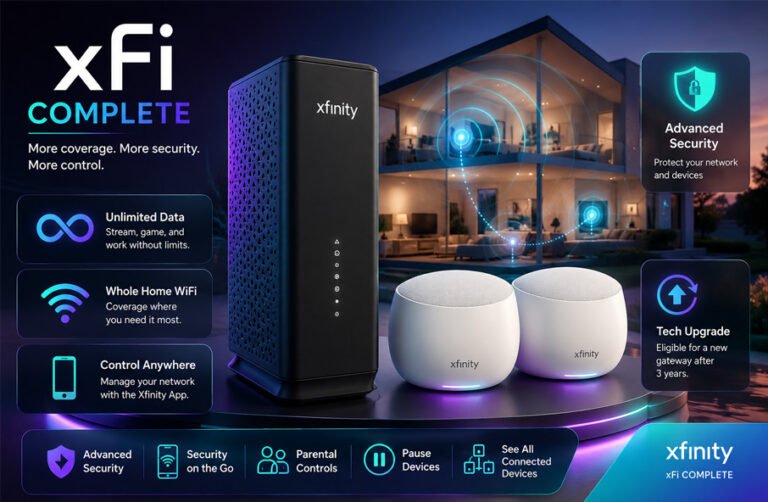
xFi Complete is an add-on service from Xfinity, which is owned by Comcast. It was created to give customers extra home WiFi features along with an Xfinity Gateway.
People often search for xFi Complete because they want to know what the monthly charge includes, whether it gives unlimited data, how WiFi Pods work, and if the service is still useful today.
This guide explains how xFi Complete works, its cost, unlimited data, Gateway equipment, WiFi coverage, security features, and other important details.
What Is xFi Complete?
xFi Complete is a service package from Xfinity. It is not a separate Internet plan and does not give you a different Internet speed by itself.
The service works with an Xfinity xFi Gateway. The Gateway is the device that connects your home to Xfinity Internet and creates your WiFi network.
xFi Complete was introduced to add more features around that Gateway. These have included unlimited data, home WiFi coverage checks, security tools, possible access to a WiFi Boost Pod, and equipment upgrades.
A 2025 source also described xFi Complete as a Comcast bundle that adds extra services to the normal xFi Gateway.
The service became especially useful for customers who had older Xfinity Internet plans with monthly data limits.
Today, xFi Complete is mainly connected with older or legacy Xfinity plans because newer Xfinity plans already include some benefits that used to make xFi Complete attractive.
How Does xFi Complete Work?
To use xFi Complete, you normally need an eligible Xfinity Internet plan and an Xfinity Gateway.
The xFi Gateway works as both a modem and a WiFi router. This means one device connects to Xfinity’s network and also sends WiFi around your home.
The Gateway can be managed through the Xfinity app. Users can check connected devices, change WiFi settings, troubleshoot problems, and use parental controls.
Xfinity’s xFi tools can also let customers pause Internet access for certain connected devices. This can be useful when managing children’s devices or controlling Internet use at certain times.
xFi Complete adds extra benefits to this basic setup.
It is important to understand that xFi Complete does not automatically increase your Internet plan speed. For example, if you pay for a certain Xfinity speed, adding xFi Complete does not change that speed tier.
WiFi coverage may improve if better equipment or a WiFi Boost Pod is used, but that is different from buying a faster Internet plan.
xFi Complete Cost
The most commonly reported price for xFi Complete on older Xfinity plans has been around $25 per month.
A March 2025 comparison also listed xFi Complete at $25 per month and the standard xFi Gateway at $14 per month.
However, xFi Complete has not always had the same price.
When Comcast introduced the service around 2020, some customers who were already renting an eligible Gateway could add xFi Complete for a lower monthly amount. Promotional prices have also existed.
This is why you may find older websites showing prices such as $10 or $11 per month.
The exact cost depends on the customer’s plan, location, promotion, and account history.
Customers who already have xFi Complete should check their Xfinity bill. It may appear as a separate monthly charge.
Before cancelling it, customers should also check what benefits are connected to the package. Removing xFi Complete from an older plan could affect unlimited data or other included features.
Unlimited Data with xFi Complete
Unlimited data was one of the biggest reasons customers chose xFi Complete.
Some older Xfinity Internet plans had a monthly data allowance of 1.2 TB in areas where Xfinity used its data plan.
Customers who went above the limit could face extra charges after applicable courtesy allowances.
xFi Complete gave eligible customers unlimited data. This meant they could use more than the normal monthly allowance without paying data overage charges under that package.
Unlimited data can be useful in homes that regularly use a large amount of Internet.
This may include households that stream a lot of 4K video, download large games, back up files to the cloud, work from home, or have many people and devices using the Internet.
The 2025 source also listed unlimited data as one of the main differences between xFi Complete and the standard Gateway.
However, this benefit is less important today.
Newer Xfinity Internet plans include unlimited data, so customers moving to a newer plan may no longer need xFi Complete just to avoid a monthly data limit.
Older customers should compare their current plan with Xfinity’s newer offers before deciding whether xFi Complete is still worth paying for.
xFi Gateway and Equipment
The xFi Gateway is an important part of xFi Complete.
It combines two devices into one unit:
- A modem that connects to Xfinity Internet.
- A router that creates the WiFi network inside your home.
The Gateway can support modern Internet and WiFi features, although the exact technology depends on the Gateway model provided to the customer.
Some xFi Gateway models use DOCSIS 3.1 technology. A 2025 source also describes the Gateway as a combined modem and router with DOCSIS 3.1 support.
Customers using xFi Complete normally need to use an eligible Xfinity Gateway to receive the full set of benefits.
This can be convenient for customers who do not want to buy and manage their own networking equipment.
However, it can be a drawback for people who prefer using their own modem, router, or advanced mesh WiFi system.
Using personal equipment may give experienced users more control over their home network, but some xFi Complete features depend on Xfinity’s own Gateway.
Gateway Tech Upgrade
One benefit connected with xFi Complete has been Xfinity’s Gateway Tech Upgrade program.
Eligible customers can receive an upgraded Gateway after about three years.
This helps customers move to newer Xfinity equipment without having to buy a new modem or router themselves.
The three-year upgrade should not be confused with replacing broken equipment.
If an Xfinity Gateway develops a hardware problem, customers can contact Xfinity for troubleshooting or replacement when needed. They do not normally have to wait until the three-year upgrade period ends simply because equipment has stopped working.
The upgrade program is mainly about moving eligible customers to newer technology.
Whole Home WiFi Evaluation
xFi Complete has also included a Whole Home WiFi evaluation.
The purpose of this evaluation is to check how well the Xfinity Gateway’s WiFi reaches different parts of the home.
A home can have fast Internet service but still have poor WiFi in certain rooms. Walls, floors, distance from the Gateway, other electronics, and the size of the home can all affect the WiFi signal.
Xfinity can use network information to identify areas where WiFi coverage may be weak.
The process is generally automated. Customers do not normally receive a technician visit just because they have xFi Complete.
If the evaluation finds that the WiFi signal is not strong enough in parts of the home, Xfinity may decide that a WiFi Boost Pod could help.
One important point is that xFi Complete does not mean every customer automatically receives a free Pod.
The customer’s network must normally meet Xfinity’s requirements before a Pod is offered as part of the coverage benefit.
WiFi Boost Pods
WiFi Boost Pods are small devices designed to improve WiFi coverage inside a home.
They plug into a power outlet and work with a compatible Xfinity Gateway.
The Pod helps extend the WiFi signal into areas where the Gateway alone may not provide strong coverage.
For example, a Gateway might provide a good connection in the living room but a weak signal in an upstairs bedroom. A correctly placed Pod can help extend coverage toward that area.
WiFi Boost Pods use mesh networking. In simple terms, the Gateway and Pods work together to create a wider home WiFi network.
The 2025 source describes xFi Complete as providing extended coverage through xFi Pods, compared with the standard coverage of the Gateway alone.
Pod placement is important. A Pod should normally be placed where it can still receive a good connection from the Gateway while also reaching the weak area.
Placing a Pod too far away can reduce its usefulness.
It is also better when a Pod can communicate directly with the Gateway. If data has to travel from the Gateway to one Pod and then through another Pod, performance can sometimes fall.
A WiFi Boost Pod does not increase the speed of your Xfinity Internet plan. Its main purpose is to improve coverage.
This means a Pod may give you a stronger and more stable connection in a room that previously had poor WiFi, but it cannot make your Internet subscription faster than the speed you pay for.
Actual WiFi performance also depends on the Pod model, Gateway, home layout, distance, interference, connected devices, and other network conditions.
xFi Complete Security Features
xFi Complete includes extra security tools that work with the Xfinity Gateway and Xfinity app.
One of the main tools is Xfinity Advanced Security. It watches the home network for unusual activity and possible security risks.
It can help detect suspicious connections, risky devices, and some types of online threats. Users may also receive alerts through the Xfinity app.
The service can add another layer of protection, but it does not make a home network completely safe from every threat. Users still need strong passwords, updated devices, and careful browsing habits.
Advanced Security on the Go
Advanced Security on the go is designed to protect supported mobile devices when they connect to WiFi outside the home.
It can use an Xfinity VPN profile to create a more secure connection when needed.
The feature works on supported iPhones and Android phones. According to Xfinity support information collected earlier, Android 10 or later and iOS 14 or later are supported. iPads are not supported for this feature.
On Android, the Xfinity app may need background location permission so it can detect when the phone changes networks.
Xfinity says this permission is used to detect network changes for the feature. It says the location is not collected or shared for this purpose.
Another VPN app can sometimes cause problems with Advanced Security on the go. If the feature does not work, users may need to check whether another VPN is active.
xFi Complete vs xFi Gateway
xFi Complete and the xFi Gateway are related, but they are not the same thing.
The xFi Gateway is the physical device used to connect a home to Xfinity Internet. It works as a modem and WiFi router.
xFi Complete is an extra service package built around that Gateway.
| Feature | xFi Gateway | xFi Complete |
|---|---|---|
| Type | Modem and router | Service bundle |
| Creates home WiFi | Yes | Uses the Gateway |
| Unlimited data | Depends on plan | Included on eligible older plans |
| WiFi coverage help | Standard Gateway coverage | Whole Home WiFi evaluation |
| WiFi Boost Pod | Not automatic | May be included if eligible |
| Extra security tools | Basic network features | Advanced Security features |
| Gateway upgrade | Standard replacement rules | Tech Upgrade benefit for eligible users |
A customer can have an xFi Gateway without having xFi Complete.
This is an important difference because some online guides treat both names as if they are separate Internet plans. They are not.
xFi Complete vs Xfinity Pro
Xfinity Pro is a newer Xfinity service that focuses mainly on better home WiFi and backup connection features.
It is not simply a new name for xFi Complete.
xFi Complete was mainly built around unlimited data, Gateway equipment, WiFi coverage, and security.
Xfinity Pro focuses more on newer WiFi equipment and extra connection tools.
Current Xfinity Pro features can include better Gateway equipment, WiFi Extenders, device boosting, and 4G LTE backup Internet during certain outages.
An optional battery backup may also be available.
Xfinity Pro has been advertised at around $15 per month, although pricing can change.
The biggest difference is that unlimited data is no longer the main reason to buy a premium add-on. Newer Xfinity Internet plans already include unlimited data.
For customers on an older plan, xFi Complete may still be useful. For customers on a newer plan, Xfinity Pro may be more relevant if they mainly want better WiFi coverage or backup connection features.
Benefits of xFi Complete
xFi Complete can still offer useful benefits for some customers.
Its main advantages include:
- Unlimited data on eligible older plans
- Use of an Xfinity Gateway
- Whole Home WiFi evaluation
- Possible WiFi Boost Pod for weak coverage
- Advanced Security tools
- Advanced Security on the go
- Network control through the Xfinity app
- Gateway Tech Upgrade eligibility
- Easier equipment management through Xfinity
The service can be useful for people who want Xfinity to manage most of their home network equipment.
It may also make sense for households that still use a legacy plan with a data limit.
Drawbacks of xFi Complete
The biggest drawback is the monthly cost.
Customers on older plans may pay around $25 per month for xFi Complete. Over a full year, that can become a noticeable extra cost.
Another drawback is that newer Xfinity plans already include unlimited data and equipment. This can reduce the value of xFi Complete.
The service also depends on Xfinity’s Gateway. People who prefer their own modem, router, or mesh WiFi system may find this limiting.
A WiFi Boost Pod is not guaranteed for every customer. The home normally has to qualify through Xfinity’s WiFi evaluation.
Pods can also improve coverage without increasing the actual Internet speed included in the plan.
Some security features may require app permissions or VPN settings. This can make setup more complicated for some users.
Is xFi Complete Still Available in 2026?
xFi Complete is mainly a legacy service in 2026.
Many new Xfinity customers are now placed on newer Internet plans that already include unlimited data and equipment.
Because of this, xFi Complete is not as important as it once was.
Existing customers may still have it on their account. It may also remain available in some markets, older plans, special properties, or limited offers.
This means it would be inaccurate to say that xFi Complete has completely disappeared.
Availability depends on the customer’s plan and account.
Customers who still pay for xFi Complete should compare their current plan with newer Xfinity options. A newer plan may include some of the same benefits for a different total monthly price.
Common xFi Complete Problems
Unexpected xFi Complete Charge
Some customers notice a separate xFi Complete charge on their bill and are not sure why it is there.
The best first step is to open the Xfinity bill and check the plan details.
If the charge is not understood, contact Xfinity and ask what benefits are connected to it before removing the service.
This is important because cancelling xFi Complete on an older plan may change unlimited data or other features.
Whole Home WiFi Evaluation Has Not Finished
Some users expect the WiFi evaluation to happen immediately.
The evaluation is usually automated and may take time after xFi Complete is activated.
If the evaluation appears delayed, check the Xfinity app and account messages first.
If there is still no result after a reasonable period, contact Xfinity support.
Free WiFi Pod Is Not Available
A common misunderstanding is that every xFi Complete customer receives a free WiFi Boost Pod.
This is not always the case.
The home normally needs to qualify through the Whole Home WiFi evaluation.
If Xfinity says a Pod is recommended but the claim process does not work, contact support and ask them to check the eligibility status.
Poor WiFi Even with a Pod
A WiFi Pod cannot help much if it is placed in the wrong location.
A Pod should usually be placed between the Gateway and the weak WiFi area.
It should still receive a good signal from the Gateway.
Moving the Pod closer to the Gateway can sometimes improve performance.
It is also better to avoid using too many Pods when they are not needed.
Advanced Security on the Go Is Not Working
This problem can happen when the phone does not meet the system requirements.
Check that the device uses a supported version of iOS or Android.
Android users should also check whether the Xfinity app has the needed background permissions.
If another VPN app is running, try turning it off because VPN services can sometimes conflict.
Slow Internet Despite xFi Complete
xFi Complete does not increase the speed tier of an Xfinity plan.
If the Internet is slow, first test the connection close to the Gateway.
If speeds are good near the Gateway but poor in another room, the problem may be WiFi coverage.
If speeds are slow everywhere, the issue may be the Internet connection, Gateway, device, or local Xfinity network.
Basic Troubleshooting Tips
The Xfinity app is the best starting point for many xFi Complete problems.
Users can check connected devices, restart the Gateway, look for service problems, and review network settings.
For WiFi problems, test the connection in more than one room. This can help show whether the problem is the Internet connection or only weak WiFi coverage.
Restarting the Gateway can also solve some temporary connection problems.
For WiFi Boost Pods, check that they are active and placed in a useful location.
For security problems, check app permissions, VPN settings, and the phone’s operating system.
If the problem is related to billing, Pod eligibility, or account features, Xfinity support may need to check the account directly.
Is xFi Complete Worth It?
xFi Complete can still be worth it for some customers, but it depends on the plan.
It may make sense if you are on an older Xfinity plan with a 1.2 TB data limit and you use a large amount of data every month.
It can also be useful if you already want to use Xfinity’s Gateway and you value the WiFi evaluation, security tools, and possible Pod benefit.
The service may be less useful if your current Xfinity plan already includes unlimited data and equipment.
It may also be poor value if you do not use the extra security tools or WiFi coverage benefits.
Customers who prefer their own router or mesh system may also prefer a different setup.
The best way to decide is to compare the total monthly cost of your current plan with newer Xfinity offers.
Do not look only at the xFi Complete charge. Compare the full bill, Internet speed, included equipment, data policy, and extra features.
Bottom Line
xFi Complete was created as an extra Xfinity Internet package with unlimited data, Gateway equipment, WiFi coverage help, security tools, and equipment upgrade benefits.
For older Xfinity customers, these features can still be useful.
Its value has changed because newer Xfinity Internet plans now include unlimited data and equipment.
Customers who still pay for xFi Complete should check exactly what they receive from it before cancelling.
If the service gives you unlimited data, useful WiFi coverage help, security features, and equipment benefits that you still need, it may be worth keeping.
If your newer plan already includes most of these benefits, paying extra for xFi Complete may no longer make sense.
Frequently Asked Questions
What is xFi Complete?
xFi Complete is an Xfinity service package that works with an eligible xFi Gateway. It has included benefits such as unlimited data on older plans, WiFi coverage help, security features, and Gateway upgrades.
How much does xFi Complete cost?
The common legacy price has been around $25 per month.
However, prices have changed over time. Promotions, plans, and account details can also affect the cost.
Customers should check their current Xfinity bill for the exact price.
Does xFi Complete include unlimited data?
Yes, unlimited data has been one of the main xFi Complete benefits for eligible older plans.
Newer Xfinity Internet plans now include unlimited data, so this benefit may not be as important for new customers.
Does xFi Complete give you a free WiFi Boost Pod?
Not automatically.
Xfinity usually checks the home’s WiFi coverage first.
If the Whole Home WiFi evaluation shows that a Pod is needed and the account qualifies, Xfinity may provide one as part of the coverage benefit.
Does xFi Complete make your Internet faster?
No.
xFi Complete does not automatically increase the Internet speed included in your plan.
A WiFi Pod or newer Gateway may improve WiFi coverage or performance inside the home, but your Internet plan still has its own speed limit.
What is the difference between xFi Complete and xFi Gateway?
The xFi Gateway is the physical modem and router.
xFi Complete is a service package that adds extra features around that Gateway.
You can have an xFi Gateway without having xFi Complete.
Is xFi Complete the same as Xfinity Pro?
No.
They are different services.
xFi Complete was mainly focused on unlimited data, Gateway equipment, WiFi coverage, and security.
Xfinity Pro is a newer add-on focused more on premium WiFi equipment, device boosting, WiFi Extenders, and backup connectivity.
Can you still get xFi Complete?
Some existing and eligible customers may still have access to xFi Complete.
However, it is mainly connected with older Xfinity plans.
New customers are more likely to see newer Xfinity plans and services instead.
Availability can depend on the customer’s account, market, property, and current Xfinity offers.
More To Explore:
SEO Agency Interamplify Review: Is It a Good Choice for International SEO?
