


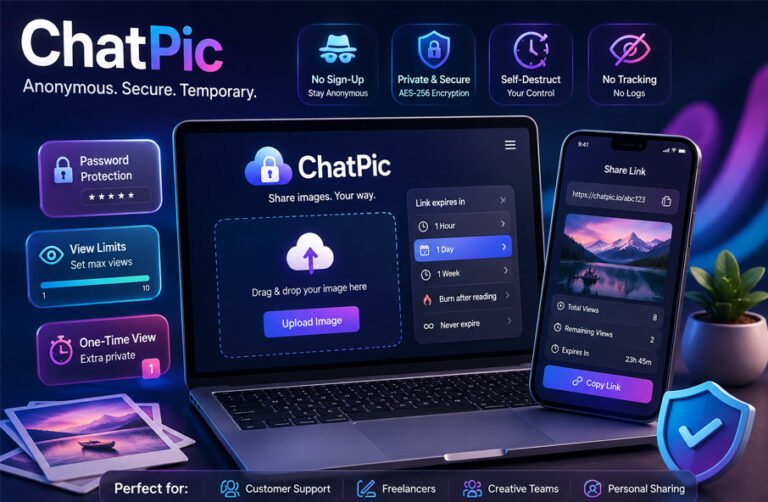
ChatPic is a name used by several image-sharing services that let people upload pictures and share them through a link. Some current versions focus on temporary sharing, where an image can disappear after a set time or number of views.
The name can be confusing because the older ChatPic.org and newer ChatPic-branded websites are not necessarily the same service. This guide explains what ChatPic is, how it works, its main features, limits, privacy, safety, benefits, risks, and alternatives.
What Is ChatPic?
ChatPic is best understood today as a name connected with online image-sharing services. Current versions generally allow users to upload an image, receive a private URL, and send that URL to someone else.
The main idea is different from permanent photo storage. Instead of creating an album or keeping a picture online indefinitely, some ChatPic services let the uploader decide how long the image should remain available or how many times it can be opened.
For example, ChatPic.io describes itself as a temporary image-sharing service. It supports private links, expiration settings, maximum view counts, password protection, and automatic deletion after selected conditions are reached. A basic upload does not require an account.
This can be useful when someone wants to share a screenshot, client preview, temporary photo, or other visual information without posting it publicly.
However, ChatPic is not one single platform today. Searches for the name can lead to ChatPic.io, TheChatPic.org, ChatPic.co, ChatPic.co.uk, and other similarly named websites. Their owners, features, limits, and privacy policies can be different.
Readers should therefore pay attention to the exact domain they are using rather than assuming every website called ChatPic works in the same way.
What Happened to the Original ChatPic.org?
The older ChatPic.org was different from many of the temporary image-sharing services that now use the ChatPic name.
Older references describe it as an anonymous image-sharing community where people could upload pictures and interact around shared content. It was designed around quick access and did not rely on a traditional user-account system.
Some later sources report that ChatPic.org appeared around 2014. However, a strong primary source confirming the exact launch date has not been found, so the year should be treated as reported rather than certain.
The service was still being discussed as an active platform in 2023, but it later stopped operating in the way users knew it. Current searches for ChatPic often lead to newer services rather than the original anonymous community.
The old platform also attracted criticism over moderation. Reports and user complaints alleged that harmful and non-consensual material appeared on the service. Some later articles make stronger claims involving legal pressure, child-safety reports, hosting companies, and payment processors.
Those stronger explanations should be treated carefully. There is not enough reliable primary evidence in the material collected so far to say that one specific event definitely caused ChatPic.org to close.
What can be said more safely is that the original ChatPic.org is no longer operating as the same anonymous image-sharing community that older users remember.
Is the Current ChatPic the Same as ChatPic.org?
No single current ChatPic website should automatically be treated as the return of the original ChatPic.org.
This is one of the most important points for anyone researching the service in 2026. Several websites now use the ChatPic name, but they can have different purposes and policies.
ChatPic.io, for example, says its current service is built for private temporary image sharing. It is not presented as a public image board, community feed, or chat-room service.
TheChatPic.org is another current website using the name. It presents itself as a privacy-focused sharing service and has described itself as independent from the original ChatPic.org.
ChatPic.co and ChatPic.co.uk also appear under searches for the name, but their privacy rules and features are not identical to those of ChatPic.io or TheChatPic.org.
For this reason, users should check:
- the exact domain name,
- the current privacy policy and terms,
- the upload limits,
- how deletion works,
- and whether a feature described in an article actually exists on that particular website.
This simple check helps avoid much of the confusion surrounding ChatPic.
There is also a separate product once listed as ChatPic – AI Photo Enhancer. It was an AI photo-editing application rather than an anonymous image host and appears to have later been renamed or rebranded as ChatMoose. It should not be confused with the temporary image-sharing websites.
How ChatPic Works
The exact steps depend on the ChatPic service being used, but the current ChatPic.io model is simple.
1. Upload Your Images
The user selects an image from a phone, tablet, laptop, or desktop computer and uploads it through the website.
ChatPic.io currently says one share can contain up to 10 images, with a maximum size of 10 MB per image. Its documentation lists common formats including JPEG, PNG, WebP, and, in some places, GIF. There is a small difference between parts of its documentation about GIF support, so users who regularly share GIF files should check the current uploader first.
2. Choose How Long the Share Should Exist
Temporary access is one of the main reasons people use this type of service.
Users can set an expiration period so that the uploaded image stops being available after a selected amount of time. Some versions also offer a burn-after-view option, which is designed to remove the content after its first opening.
This differs from normal image hosting, where an uploaded picture may remain online until the owner manually removes it.
3. Add Access Controls
Some ChatPic services let the uploader add a password.
A view limit can also control how many times the link may be opened. On ChatPic.io, reaching the selected view limit can trigger automatic deletion.
These controls can reduce unnecessary access, although they do not prevent a person who has already viewed the image from copying it.
4. Generate and Send the Link
After the upload finishes, ChatPic generates a shareable URL.
The uploader can send the link through WhatsApp, Telegram, email, workplace chat, customer-support tickets, forums, or another communication service.
The recipient normally opens the URL in a browser and does not need to create a ChatPic account simply to view the shared image.
A private link is not the same as guaranteed privacy. Anyone who receives or obtains the URL may be able to open the image while it remains active unless extra protection, such as a password, is enabled.
5. Manage the Share
ChatPic.io provides an uploader dashboard for active shares.
According to its current documentation, this dashboard can display the total number of views, remaining views, expiry time, image count, and countries from which the share was accessed. Users may also be able to extend the expiration period or delete an active share.
The management link is important because some temporary-sharing services do not use a normal account dashboard. If the management URL or deletion token is lost, controlling the upload later may become more difficult.
Main ChatPic Features
The features available under the ChatPic name vary by website. The following are among the most useful functions documented by current services.
No-Account Uploading
One of ChatPic’s main attractions is the ability to share an image without first creating a normal profile.
This removes steps such as email verification, choosing a username, or remembering another password. It is useful for quick one-time sharing.
No signup, however, should not automatically be interpreted as complete anonymity. The privacy section later in this guide explains that some services may still process technical information.
Expiring Links
Expiring links make an uploaded image available only for a limited period.
This can be useful when a screenshot, preview, or other image is needed temporarily rather than as permanent online storage.
Once the selected expiration period is reached, services offering automatic deletion can remove the hosted file or make the link unavailable.
View Limits
A time limit is not the only way to control access.
ChatPic.io also allows users to restrict how many times a share can be opened. Once the maximum number of views is reached, the image can become unavailable.
This may be useful when an image only needs to be reviewed by one person or a small number of people.
Burn After View
Burn-after-view is a stricter version of a view limit.
The link is designed to work once. After the first successful viewing, the hosted copy is removed or made unavailable.
This does not mean the viewer is technically prevented from taking a screenshot or otherwise preserving the content. It only controls the copy hosted by the service.
Password Protection
Some current ChatPic platforms offer optional password protection.
Instead of relying only on possession of the URL, the viewer must also enter the correct password. This adds another barrier if the link is accidentally forwarded or exposed.
For better security, the password should normally be sent through a different communication method from the sharing link.
Automatic and Manual Deletion
Temporary ChatPic services can automatically remove uploads after an expiration period or view limit is reached.
Some also provide a dashboard link or deletion token that lets the uploader remove the image manually before its scheduled expiry.
This gives users more control than a basic permanent image host.
QR Code Sharing
Some ChatPic-branded services can create a QR code for an uploaded image.
A second person can scan the code with a phone rather than manually typing or copying the URL. This can be convenient when sharing between devices or in person.
Metadata Removal
Digital photographs can contain EXIF metadata. Depending on the device and settings, this information may include the date a photograph was taken, camera model, and sometimes location data.
Some ChatPic services say they remove this information during processing. Others may not.
Users should therefore check the policy of the exact service instead of assuming that every ChatPic website automatically strips metadata.
Session Watermarking
ChatPic.io also documents a session-watermarking feature. It can place or associate a viewing session with an identifier that may help trace a leaked screenshot.
A watermark can discourage casual copying, but it cannot technically prevent someone from photographing or recording the screen.
Supported Files, Upload Limits, and Devices
The file formats and upload limits depend on the ChatPic service.
Current ChatPic.io information supports common web image formats including JPG/JPEG, PNG, and WebP. GIF is also listed in part of its upload documentation, although another FAQ does not list it.
ChatPic.io currently describes a limit of 10 MB per image and up to 10 images in one share.
Other ChatPic-branded websites have published different limits. Claims such as 50 MB free uploads, 100 MB paid uploads, and MP4 video support should not be applied to ChatPic as a whole unless they are confirmed for the exact domain being discussed.
ChatPic is mainly browser-based. This means it can generally be accessed through a modern web browser on:
- desktop computers,
- laptops,
- smartphones,
- and tablets.
An internet connection is required to upload and access hosted files.
A website working on a mobile browser does not mean that it has an official Android or iPhone app. Users should check the service’s official website or app-store listing before downloading anything that uses the ChatPic name.
Is ChatPic Free?
ChatPic.io currently describes its basic image-sharing service as free and does not require an account for uploading.
Other websites using the ChatPic name may have different limits or paid features. One supplied source reports a Pro plan costing $4.99 per month, along with larger upload limits, but this information has not been verified strongly enough to treat it as universal or current ChatPic pricing.
For that reason, it is better to check the pricing page of the exact ChatPic service before paying for anything.
The separate ChatPic AI photo-editing app also used its own subscription and credit pricing. Those charges belong to the AI application and should not be confused with the browser-based temporary image-sharing services.
The next part of this guide will look at ChatPic privacy, safety, disappearing images, benefits, risks, legal use, alternatives, and practical tips for safer sharing.
ChatPic Privacy
Privacy depends on the exact ChatPic service you use. The name is used by several websites, and their policies are not identical.
A service may let you upload without creating an account, but that does not always mean it collects no technical data. For example, ChatPic.io says it may process information such as IP addresses, browser or device details, and access timestamps for security, abuse prevention, and service performance.
This is why “no signup required” and “completely anonymous” are not the same thing.
Some current ChatPic services also focus on temporary storage. ChatPic.io says uploaded images are kept until the selected expiry period or view limit is reached. It also says it does not permanently keep images beyond their intended lifespan.
Metadata is another privacy issue. Photos can contain EXIF information such as the camera model, date, and sometimes GPS location. Some ChatPic-branded services say they remove this metadata automatically, while others may not. Users should check the current policy of the exact service before uploading personal photos.
Password protection can add another layer of privacy. Some services also describe encrypted storage or browser-side encryption, but encryption claims should only be applied to the specific service that documents them.
The safest approach is to read the privacy policy of the exact ChatPic domain you plan to use. Privacy claims can change, and one ChatPic website should not be used as evidence for another.
Is ChatPic Safe?
ChatPic can provide useful safety controls, but no online image-sharing service can guarantee complete security.
Features such as password protection, expiring links, view limits, and automatic deletion can reduce how long an image remains available. These controls are helpful when compared with leaving a file online permanently.
ChatPic.io also states that no method of online storage or transmission can be guaranteed to be fully secure.
The safety of the service also depends on what you upload. It is better not to share images containing passwords, banking details, authentication codes, identity documents, private addresses, or other information that could cause serious harm if copied.
Some newer ChatPic-branded websites describe moderation systems, reporting tools, and rules against illegal content. Claims about AI moderation or dedicated human review teams should be treated as service-specific unless the operator provides clear current documentation.
Users should also be careful with unofficial websites using a similar name. The existence of several ChatPic domains makes it important to confirm the exact address before uploading anything.
Can Someone Save a Disappearing ChatPic?
Yes. A disappearing or self-destructing image can still be copied before it disappears.
Expiration controls only affect the version stored by the hosting service. They cannot fully control what a person does after the image appears on their screen.
ChatPic.io’s own information explains that websites cannot reliably block screenshots on every browser and device.
A recipient may be able to take a screenshot, save the image where downloading is possible, photograph the screen with another device, or copy information shown inside the picture.
For this reason, burn-after-view should be understood as a way to reduce continued access. It is not a guarantee that the image disappears from every device.
If an image would cause serious problems if copied, a temporary link alone is not enough protection.
Benefits of Using ChatPic
The main benefit of ChatPic-style services is control over temporary sharing.
Users can often upload an image without creating an account. This makes the process quick and removes the need for email verification or a permanent profile.
Expiring links can help when an image only needs to remain online for a short time. View limits give additional control over how often the link can be opened. Burn-after-view is useful when the hosted copy should only be available once.
Password protection can reduce the risk of someone opening a link if it is forwarded by mistake. Automatic deletion also means users do not always need to return later and manually remove an old upload.
These features can be useful for screenshots, design previews, temporary client files, support images, and other visual material that does not need permanent storage.
Temporary hosting can also reduce the amount of time a file remains accessible online compared with a permanent image host.
Risks and Limitations
ChatPic also has clear limitations.
The biggest one is that the uploader cannot fully control the recipient. A person who can see the image may still save it, take a screenshot, or share the link with someone else.
A private link can also be forwarded. Unless password protection or another access control is used, anyone who gets the URL may be able to open the image while it remains active.
No-account sharing does not always mean zero tracking. Some services may still process IP addresses and other technical information.
Expired images are generally not suitable for recovery. If the service deletes the file after the selected limit, users should not expect it to work as backup storage.
Temporary image hosts are also less useful for searchable galleries, permanent albums, long-term file organization, or archiving.
There is another important limitation specific to ChatPic: several unrelated services use the same or similar name. Their upload limits, privacy rules, deletion systems, and features can differ. Readers should not assume that information from one domain applies to another.
Who Is ChatPic Useful For?
ChatPic can be useful when an image only needs to be available for a limited purpose.
Students may use temporary sharing to send project screenshots or visual work to classmates. Freelancers can share previews with clients without creating a full cloud folder.
Designers and creative teams may find expiring links useful during short review periods. Customer-support users can share screenshots of errors or technical problems without posting them publicly.
Photographers may use temporary links for previews, while everyday users may simply want to send a photo or meme without putting it on a social network.
The current temporary-sharing model is best understood as a utility rather than a social network.
People handling highly sensitive documents should be more careful. Journalists, legal professionals, or anyone working with confidential material should not assume that an anonymous image host provides the same level of protection as a purpose-built secure communication service.
Image Ownership, Copyright, and Legal Use
Using an image-sharing service is not automatically illegal. The legal issue usually depends on what is uploaded and how it is shared.
Users should only upload images they own or have permission to distribute. Temporary deletion does not remove copyright responsibilities.
ChatPic.io’s terms state that users retain ownership of their uploaded content. The service receives a limited license to store and process the files for the purpose of operating the platform. Its terms also restrict content that violates copyright, privacy rights, laws, or other intellectual property protections.
Private or intimate images should never be shared without the person’s consent. Illegal sexual content, abusive material, threats, and other unlawful uploads may also violate both service rules and applicable laws.
Some ChatPic-branded services describe DMCA or reporting procedures for removing infringing or harmful material. These procedures should be checked on the specific website being used.
There is no useful way to describe ChatPic as simply “legal” or “illegal” everywhere. Laws differ by country, and the legality of an upload depends on its content, ownership, consent, and local rules.
ChatPic Alternatives
Several alternatives may be better depending on whether you need simple image hosting, long-term storage, or controlled sharing.
Imgur
Imgur is a well-known image-hosting and sharing platform. People commonly use it for screenshots, memes, forum images, and public or link-based sharing.
Its main strength is ease of use and broad recognition. It is more suitable than a temporary ChatPic service when you want an image to remain available for longer or be shared in public communities.
However, it is not mainly built around short-lived private links. Users who specifically want burn-after-view or strict expiry controls may prefer a service designed for temporary sharing.
Postimages
Postimages is a straightforward image-hosting service that creates direct and shareable image links.
People often use it for forums, websites, screenshots, and simple image hosting because the upload process is easy and does not require a complex setup.
It is a practical choice when the main goal is to host an image and obtain a link. Compared with ChatPic-style temporary services, it is more focused on basic image hosting than controlled short-term access.
ImgBB
ImgBB is another browser-based image-hosting service.
It lets users upload images and generate links that can be shared on websites, forums, and messaging platforms. It is often chosen because the process is simple and works well for normal image hosting.
ImgBB can be more suitable when you want a traditional image host rather than a one-time or self-destructing link.
Google Photos
Google Photos is designed more for photo storage, organization, backup, and sharing.
It is useful for personal photo libraries and albums. Users can create shared links or albums and keep their files available over a longer period.
Compared with ChatPic, Google Photos requires more account-based management, but it is better suited to people who want to organize and keep photos rather than make them disappear automatically.
Google Drive
Google Drive is a general cloud-storage service rather than an image host.
It is useful for sharing images, documents, folders, and other files with specific people. Users can manage permissions, store files for long periods, and organize content in folders.
Google Drive is usually a better choice for work files, collaboration, backups, and long-term storage. ChatPic-style services make more sense when the main goal is fast, temporary image access.
When comparing alternatives, users should look at account requirements, privacy policies, file limits, deletion options, moderation, and how long files remain available.
Tips for Using ChatPic More Safely
A few simple steps can reduce risk when using a temporary image-sharing service:
- Check the exact ChatPic domain before uploading.
- Read the current privacy policy and terms.
- Use the shortest expiry period that fits your needs.
- Set a low view limit when possible.
- Add a password for private material.
- Send the password separately from the image link.
- Remove GPS and other unnecessary metadata if the site does not do it automatically.
- Crop or blur personal information in screenshots.
- Save the dashboard URL or deletion token if one is provided.
- Keep your own copy of anything important.
- Never use a temporary image host as your only backup.
- Assume that anything visible to the recipient can potentially be copied.
These steps do not remove every risk, but they give the uploader more control over what is shared and how long it stays available.
Bottom Line
ChatPic today is best understood as a name used by several image-sharing services rather than one single platform.
The original ChatPic.org was an older anonymous image-sharing community that is no longer operating in the same form. Current services such as ChatPic.io focus more on temporary sharing through expiring links, view limits, passwords, and automatic deletion.
These tools can be useful when an image only needs to stay online for a short time. Their main limitation is that they cannot control what a recipient does after seeing the content.
Before using any ChatPic-branded website, check the exact domain, its current privacy policy, upload limits, and deletion rules. The name alone does not tell you how that specific service handles your files.
Frequently Asked Questions
What is ChatPic?
ChatPic is a name associated with image-sharing services that let users upload pictures and send them through shareable links. Current services such as ChatPic.io focus on temporary sharing with options such as expiry periods, view limits, and passwords.
Is ChatPic still working in 2026?
Yes, ChatPic-branded services are active in 2026. However, they should not automatically be confused with the older ChatPic.org platform. Different domains may be operated independently and may offer different features.
Is ChatPic free?
ChatPic.io currently describes its temporary image-sharing service as free to use and does not require an account for basic uploads. Other ChatPic-branded websites may have different plans or limits.
Do I need an account to use ChatPic?
For basic sharing on services such as ChatPic.io, an account is not required. Users can upload an image and receive a sharing link without creating a traditional profile.
Does ChatPic delete images automatically?
ChatPic.io says images can be deleted automatically when their selected expiration period ends or when the maximum view count is reached. Other ChatPic services may use different deletion rules.
Does ChatPic store or track my IP address?
It depends on the service. ChatPic.io says it may process IP addresses, browser or device information, and access timestamps for security and abuse prevention. This is why account-free sharing should not automatically be described as completely anonymous.
Can someone screenshot a ChatPic image?
Yes. A temporary or burn-after-view link cannot reliably stop someone from taking a screenshot, photographing the screen, or otherwise copying information they can see.
Is ChatPic safe for private photos?
ChatPic can offer useful controls such as passwords, expiration periods, view limits, and automatic deletion. These features reduce exposure, but they do not guarantee complete privacy. Avoid sharing anything that could cause serious harm if the recipient copied or saved it.
More To Explore:
